

Instruction Two-factor authentication
Electronic applications for import and export permits
User manual NDS-WEB (PDF, 1 MB, 26.01.2026)Version: 7.1
Domestic Trade (former MESA): National trade register for controlled substances
Single cultivation authorization for cultivation of cannabis for medical purposes
Frequently asked questions about NDS-WEB2
Please contact us at ndsweb@swissmedic.ch and we will reset the two-factor authentication for you.
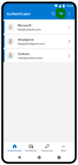
Go directly to the Authenticator app and tap the + sign (see image). Then tap “Other” and scan the displayed QR code with your smartphone. After scanning, the new profile will appear in the Authenticator app. Name this account with a unique description (e.g. NDS-WEB Domestic, NDS-WEB IMP_EXP).
Your account password has likely expired (by default every 90 days) and needs to be reset. To do so, follow these steps:
- Login
- Enter «User name»
- Leave the «Password» field blank
- Click “Forgot Password?”
You can also reset your password even if you’re not sure whether it has expired or not.
Contact
Swissmedic
Division Narcotics
Hallerstrasse 7
3012 Berne
Switzerland
Last modification 26.08.2026